Print course invoices
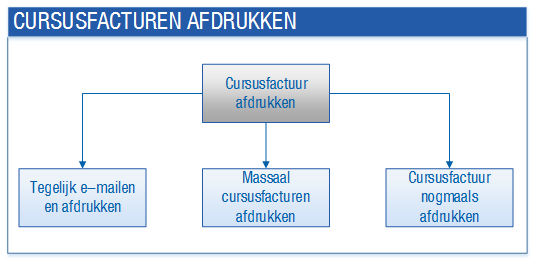
You can print your course invoices using various actions. The difference between these actions is whether you want to print them in bulk or individually.
|
Content |
Description
If you print the course invoices in bulk, you have the option to e-mail the course invoices in the same run. The invoice is either printed or e-mailed, depending on the settings in the sales contact profile and/or the sales contact.
You only print an individual invoice if a course participant indicates that he has not received the invoice.
Diagram of printing course invoices:
Preparation
- Configure printing and e-mailing reports
You specify whether the student should receive an e-mail or a quotation by post in the sales contact profile and for the sales contact itself. At the sales contact level, you specify if the customer wants to receive an e-invoice for each invoice type.
Procedure
- Print, e-mail and save course invoices in a dossier in bulk
In a single action you can e-mail, print and save a selection of the course invoices in the dossier.
- Print course invoices in bulk
You can print course invoices in bulk.
- Print (or reprint) a course invoice
You can print a course invoice again. For example if the course participant indicates that he has not received the invoice.