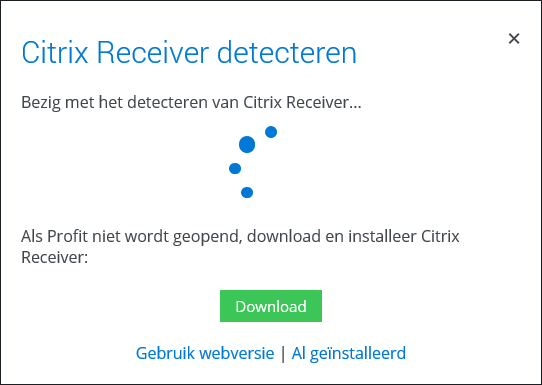
Web version instead of Citrix Receiver

AFAS recommends Citrix Receiver to run Profit Windows. If you can't install Citrix Receiver, you can run Profit Windows in a browser with Use web version. Use a browser supported by AFAS.

Differences between Citrix Receiver and the web version:

  • Saving and uploading files works differently; see the explanation below.
  • You cannot print in the web version.
  • You can copy something (outside AFAS) and paste it into Citrix Receiver. This is not possible in the web version.

The PCC can be used both in the web version and in Citrix Receiver.

To start the web version:

When you start Profit Windows via the AFAS Online portal, click on Use web version at the bottom.
Configure the preference for the web version or Citrix Workspace/ Receiver:

AFAS Online remembers your choice for the web version or Citrix Workspace/ Receiver. If you're using the webversion and you want to switch to Citrix or the other way around, then you should first remove a setting.

  1. Open the AFAS Online Portal
  2. Click Settings/Preferences.
  3. Click Remove preference setting for Citrix Receiver.
  4. Start Profit Windows.

    You can open a production environment (P12345AA), a test environment (T12345AA) and an acceptance environment (A12345AA) at the same time on one computer with one Profit Windows user (12345.test).

    You must use the web version for this and not Citrix Receiver.

    You open one environment twice on one computer with two different users.

    • The users must have a separate email address
    • You need to use different browsers.
    • You open the environments through the web version and not Citrix Receiver.

    For example:

    • You open the P12345AA environment in Google Chrome with user 12345.john, email address john@enyoi.com.
    • You open the P12345AA environment in Firefox with user 12345.test, email address john.richards@gmail.com.

      You open two environments on one computer with two different users.

      • The users must have a separate email address
      • You need to use different browsers.
      • You open the environments through the web version and not Citrix Receiver.

      For example:

      • You can open the P12345AA environment in Google Chrome through www.afasonline.nl. You log in as user 12345.john with email address john@enyoi.com.
      • You open environment P56789AA in Firefox through www.afasonline.nl. You log in as user 56789.test with email address john.richards@gmail.com.
    From Profit, save a file locally or upload one to Profit.
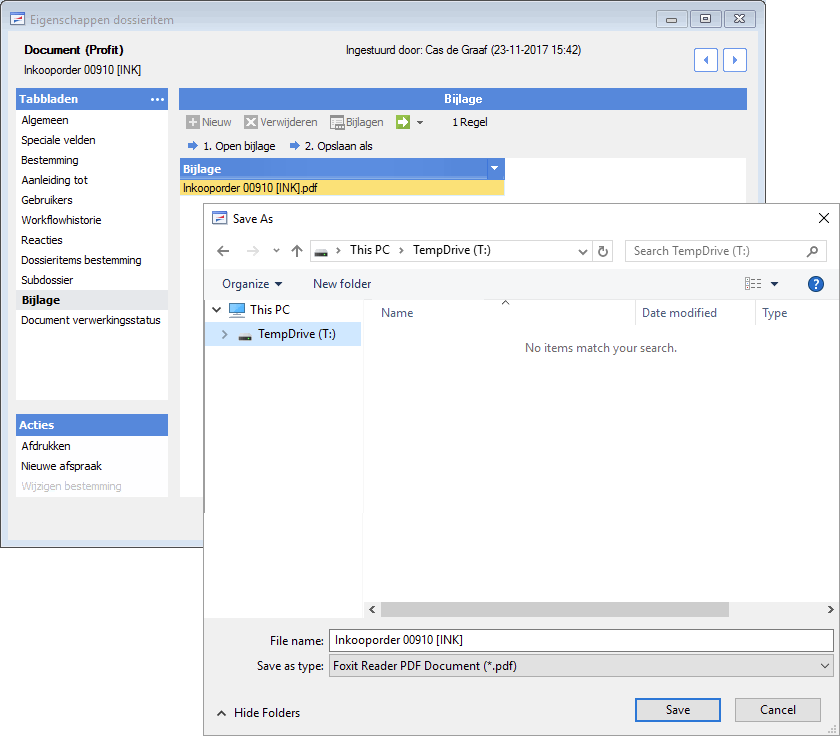
    1. Use the action to save the file externally.
    2. Save the file on the T-drive. This is a temporary disk. It only shows files that you save during your current session.
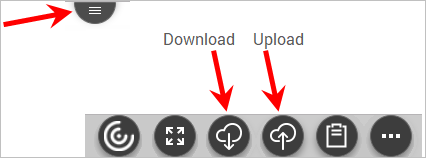
    3. Click the button at the top. The toolbar will be displayed. Click the download button. Next, you can save the file locally.
    Cut/copy and paste:

    If you copy something outside the session, you cannot paste it directly into Profit. To do this, use the following steps.

    1. Copy the text.

    2. Go to your browser.
    3. Click the button at the top. Click on the Clipboard button and paste your text (Ctrl+V).
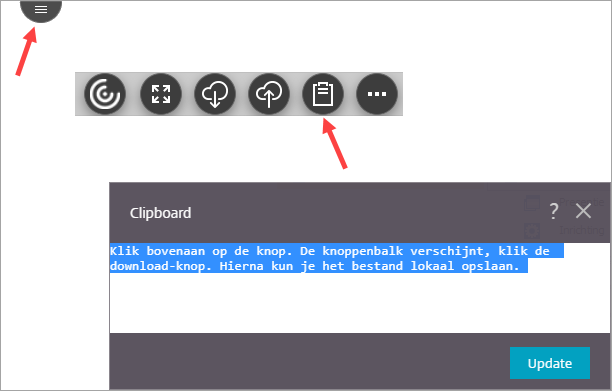
    4. Paste the text into Profit.

Directly to

  1. Logging into AFAS Online
  2. Logging into AFAS Online for the first time using two-factor authentication.
  3. Logging in with AFAS Pocket using a unique number
  4. Signing on by means of two-factor authentication
  5. Switching the authentication method
  6. Forgotten my telephone in relation to two-factor authentication
  7. Using a web version instead of Citrix Receiver
  8. Change personal data/I have a new phone
  9. Signing on by means of Single sign-on
  10. Logging in through text messaging will stop as of 1-1-2022