Employee employment

The contractual agreements between the employee and the employer must be specified in an employment. In Profit, an employment always starts with reporting the employment start of the employee.

Description

The constituent parts of an employment are:
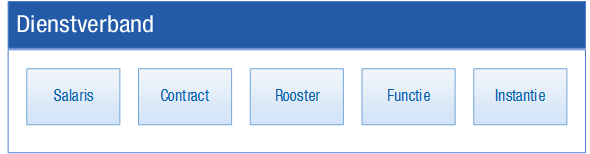
Hrm_Dienstverbanden medewerker (SCORFI)

In the properties of an employee, you can find tabs for these parts containing both current and historical data. This data has a certain validity period which is indicated by a start and end date. Within an employment the validity periods should be consecutive. If you add a new line, Profit will automatically end the previous line.

Example: 

Below you can see the contract history of an employee:
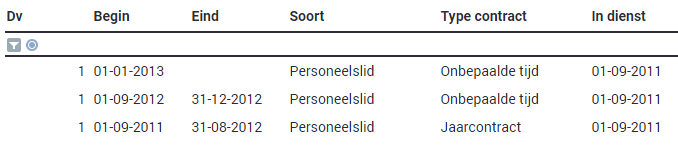
The employment of this employee started with a year contract on 1 January 2011. After a year the employee was given an annual contract again and then a permanent contract. The permanent contract does not have an end date, so this is the current contract.

There can only be a gap between the end date of a line and the start date of the next line this involves new employment.

Example: 

This employee first had a temporary contract. Then there was a new employment as from 1 September 2009.

The interdependence between the parts of the employment

The parts of the employment are all closely related. For example, if you add a new timetable line, Profit automatically adds a new salary line.

More information on the interdependence of the parts.

Below is a graphic representation of possible actions:

You add the following:

Profit automatically adds:

Contract line

Job/OU line + timetable line + salary line

Job line

Salary line

Timetable line

Salary line

Salary line

-

Agency line

-

If Profit automatically adds a line, the properties of the previous line are copied (with the exception of the start and end dates). During the year-end transition in Profit Payroll, Profit automatically adds a new agency line for the tax authority if this is required for a correct wage calculation.

The above coherence also affects the changing or deleting of data:

  • Contract lines

    When deleting a contract you automatically also delete the associated timetable, salary and job lines.

    If you delete the end date in a contract, you also delete the end date of the associated timetable, salary and job lines.

    When changing the start date of a contract, the corresponding start dates of the timetable, salary and job lines are automatically modified. If the start date of the latest contract follows on from a previous contract, then the end date of the contract is also automatically modified.

    Within an existing contract you can no longer change the CLA/term of employment and the employer. If you want to change the CLA/terms of employment, you must add a contract line. If an employee starts employment with a different employer, you must always report their employment as ended with the old employer and report them as employed with the new employer.

    Within a period, you can only add one change to a contract.

  • Timetable lines

    When adding a new timetable to an employee, you automatically add a new salary record. If you insert a timetable in between existing timetables, the start and end dates of the subsequent timetables are automatically changed.

  • Salary lines

    You can add a new salary regardless of the contract, timetable, and job. You can also delete a salary line regardless of these, whereby you also automatically delete the end date of the previous salary line.

Delete salary, job, or timetable lines

If Profit has automatically added a salary, job or timetable line, you cannot delete the individual salary, job, or timetable line manually. You are then obliged to delete the parent line after which Profit will also delete the linked salary, job and timetable lines. The entry level in the view tells you whether you can delete the salary, job or timetable line.

Procedure
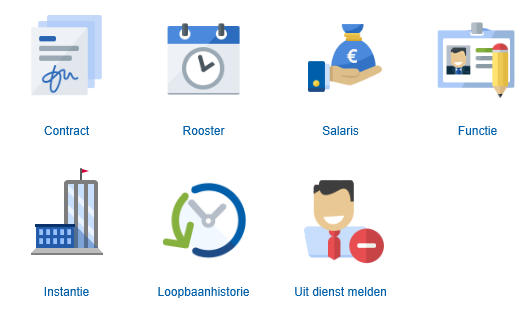
Other procedures:

  • Maintain an employment in InSite
  • 'Wet Werk en Zekerheid'
  • Employee changes employer within Profit
  • Employee changes CLAs while continuing to work for the same employer
  • Education documents

Also see

  • Multiple simultaneous employments
  • Combined changes to salary, contract, timetable and job in InSite