VAT on vehicle expenses in Belgium
In Belgium, only 50% of the VAT on vehicle expenses (e.g. lease) is deductible, i.e. 10.5% instead of the 21% rate indicated on the invoice from the leasing company. The other half of the VAT amount therefore falls under the costs.
To add a VAT code for vehicle expenses:
In this example we assume that the Legislative Country is set to Belgium.
- Go to:Financial / VAT/ICP / Configuration / VAT code.
- Click on: New.
- Complete the fields.
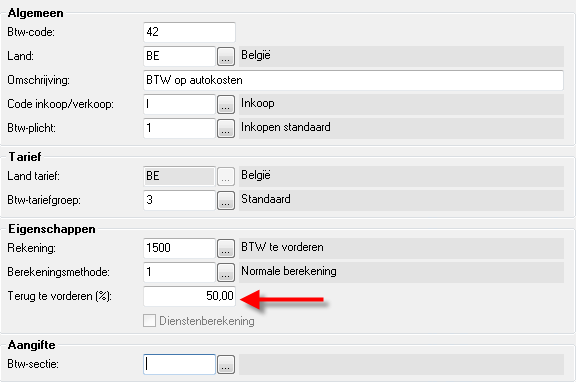
- Click on: Finish.
- Now, you link the VAT code to the correct VAT section. You can check the settings for the VAT code of 21% that is already present.
- You can link this VAT code as a preferred VAT code for a ledger account. If you do, then this code will be suggested automatically when entering the purchase invoices.
See also