Use Profit Windows to edit an attachment to a dossier item

You can edit an attachment (Word or Excel file) to a dossier item in Profit Windows.

You start the edit in Profit Windows. The file to be edited is prepared. Edit the attachment using the local Office application and then record it again in Profit.

Conditions:

  • You have installed the Profit Communication Center locally.
  • Editing is allowed based on the dossier item type.
  • The AFAS Temporary Office Accessapp connector must be unblocked.
  • You can only edit Microsoft Office attachments for versions of Office which are supported by AFAS. Please refer to platform and product support. For example, you can edit Word files with the extension .DOCX, but editing .DOC files is not possible. The .DOC file format is obsolete.

To edit the attachment to a dossier item (AFAS Online):

  1. Open the dossier item.
  2. Click on the action: Edit attachment.

    The file is prepared.

  3. The next steps depend on the situation:

    File is opened automatically

    Profit always checks first if the file can be opened automatically on your workstation.

    Conditions:

    • You have installed the PCC and linked it to the environment.
    • You have installed a supported version of Word on your workstation.

    If Profit is installed locally, the file is always opened immediately.

    Open a file manually using InSite

    To open a file using InSite:

    1. Start InSite.
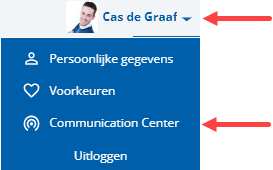
    2. Click on: Communication Center.

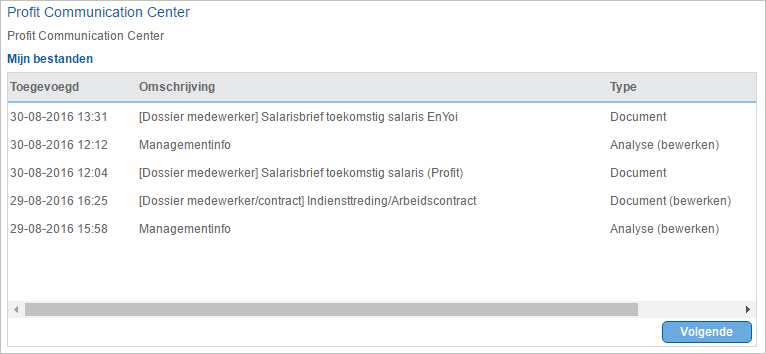
    3. Click on the file.

      You can open many different types of files from this list. Always look at the indication in the Type column.

      The file is saved to your hard disk and you open it in your locally installed version of Microsoft Office.

      Exported files are removed from the My files view after 48 hours. You can remove files yourself by selecting General / Output / My files in Profit Windows.

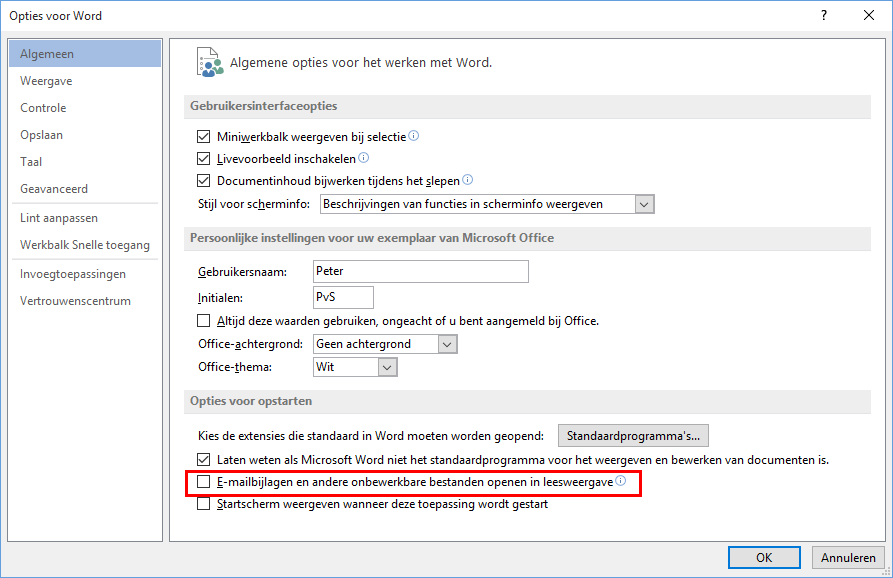
    When you open a Word file manually using My files, the E-mailbijlagen en andere onbewerkbare bestanden openen in leesweergave check box must be deselected. Open Word, go to Bestand / Opties and check this setting.

    Open a file manually using Profit Windows

    To open a file using Profit Windows:

    1. Go to:General / Output / My files.
    2. Double-click on the file.
    3. Save the file to a local disk.
    4. Open the file in your locally installed version of Microsoft Office.

    See also:

    • Save files (AFAS Online)

    When you open a Word file manually using My files, the E-mailbijlagen en andere onbewerkbare bestanden openen in leesweergave check box must be deselected. Open Word, go to Bestand / Opties and check this setting.

  4. Edit the document.
  5. Click on the action: Save.

    Crm_Bijlage bij dossieritem bewerken in InSite via Profit Office Connector

  6. Close the document.

Directly to

  1. Record dossier items using the Profit Communication Center
  2. Install and configure the Profit Communication Center
  3. Link an environment to the Profit Communication Center
  4. Configure a dossier for InSite
  5. Microsoft Office support
  6. Check the dossier item type
  7. Record an Office document as a dossier item (Profit Communication Center)
  8. Record an e-mail message (Outlook) as a dossier item
  9. Use the Explorer to record a file as a dossier item
  10. Use InSite to edit an attachment to a dossier item
  11. Use Profit Windows to edit an attachment to a dossier item